
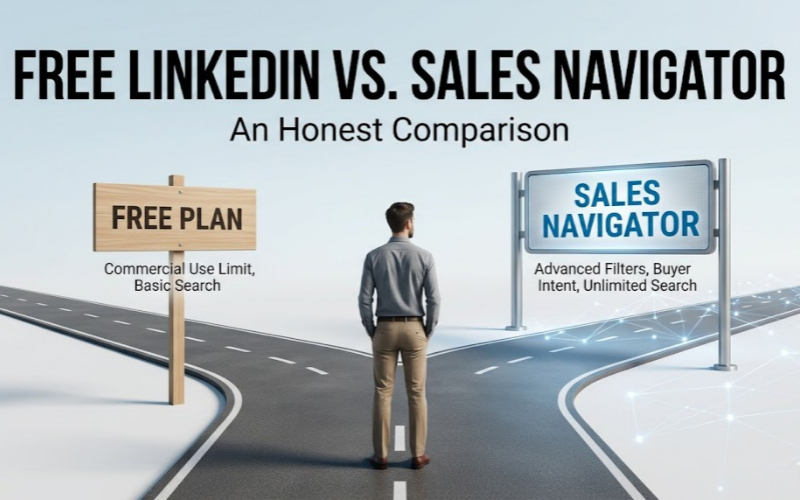
If you are trying to build an outbound pipeline on LinkedIn, you eventually hit a fork in the road.
You either work around the strict limits of a standard free account, or you hand Microsoft roughly $1,200 to $1,600 a year for a Sales Navigator (SN) subscription.
Upgrading to a premium tier doesn’t automatically print money. Many seasoned operators actually find the native SN workflow surprisingly clunky.
At the same time, trying to scale on a free account requires a lot of patience.
Here is a direct breakdown of how these two options actually stack up, backed by the numbers, so you can figure out which path makes sense for your current operation.
The Baseline Comparison
| Feature | Standard (Free) | Sales Navigator Core | The Operator Reality |
|---|---|---|---|
| Monthly Cost | $0 | ~$99 – $135 | You either pay with cash or with your time. |
| Search Limits | Commercial Use Limit (hits fast) | Unlimited | Free limits make scaling impossible. |
| Connection Requests | ~100/week | ~100/week | Paid tiers don’t bypass the platform’s anti-spam caps. |
| Advanced Filters | Basic (Title, Location) | 30+ (Intent, Recent Activity) | The only legitimate reason to hand over your credit card. |
The Free Plan: Keeping Your Overhead Low
A standard profile is great for personal branding and casual networking. However, running a heavy outbound campaign here is an uphill battle.
Run a few targeted searches, and your results blur out.
You hit a hard cap at exactly 100 connection requests a week—a strict limit the platform rolled out across the board to cut down on automation spam.
Plus, your underlying Social Selling Index (SSI) dictates your algorithmic reach.
Internal data suggests users with an SSI over 70 see a 45% bump in organic reach, but free accounts don’t get the artificial metric boost that paid subscriptions automatically receive.
Some bootstrapped operators choose to bypass these hurdles by plugging automation tools like Closely or Waalaxy straight into a standard account. It is a solid hustle.
You sacrifice surgical targeting, but you keep your monthly overhead at zero.
If you are just testing the waters or have zero budget, this is your starting line. You just have to navigate the restrictions carefully.
Sales Navigator: Paying for Hyper-Specific Signals
If you are going to pay the subscription cost for SN, you are paying for the advanced filters.
Moving past basic job titles is where the real value sits.
My take? The two most crucial filters you unlock are “Buyer Intent” and “Posted in the last 30 days.”
Out of LinkedIn’s massive 1 billion user base, only about 1% to 3% actually post content weekly. Sales Nav actively flags these accounts.
Pair that recent activity with purchasing signals, and you guarantee you are pitching to an active user.
Reaching out to dormant profiles burns through your weekly limits with zero return. The paid tier is the best way to guarantee a pulse on the other end of your pitch.
The InMail Debate
The official brochures sell SN’s InMail feature as the ultimate executive perk, handing you 50 credits a month.
In my experience, InMail is often heavily overrated.
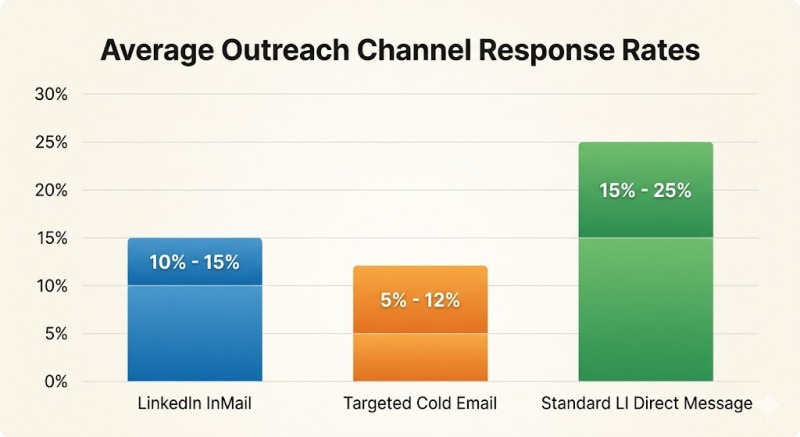
Industry benchmarks show that average InMail response rates hover between 10% and 15%—and that is assuming your pitch is highly tailored.
Many veteran prospectors skip it entirely.
C-suite inboxes are already heavily saturated with automated pitches, making a direct email or an X DM a much cleaner, quieter channel.
Outreach Channel Benchmarks
| Channel | Average Open Rate | Average Reply Rate | The Verdict |
|---|---|---|---|
| LinkedIn InMail | 50% – 65% | 10% – 15% | Overcrowded. Executives tend to ignore the “Sponsored” tag. |
| Targeted Cold Email | 40% – 60% | 5% – 12% | Cheaper to scale, easier to automate off-platform. |
| Standard LI Direct Message | High (if connected) | 15% – 25% | Requires the accepted connection first, but feels native. |
On the free plan, you rely strictly on connection request notes and regular DMs.
Honestly? That is often enough if your offer is good and copywriting is sharp!
If you do use SN and InMails, remember you cannot hoard your credits for a massive end-of-quarter blast. Use them consistently or lose them to the hard cap.
The Shared Frustration: It’s Just a Directory
Here is the main friction point regardless of which plan you choose: LinkedIn is an incredible search engine, but it is not built to be your CRM.
Over 80% of all B2B social leads are sourced on this network, yet the platform keeps your data locked inside its walled garden.
You cannot natively export a list to a CSV on either a free or paid account. Because of this bottleneck, modern agencies treat SN simply as a data layer.
They run complex boolean searches, then deploy third-party extraction tools like Evaboot or Apollo to pull those lists and find actual corporate emails.
Smaller outfits stack SN with browser extensions to scrape emails on a pay-as-you-go model, avoiding bloated enterprise contracts altogether.
To give you an idea of what a scalable outbound operation actually costs, you have to factor in the extraction and sending software, not just the SN license.
The Actual Cost of a Scalable Tech Stack
| Tool Category | Example Providers | Est. Monthly Cost | The Function |
|---|---|---|---|
| The Directory | Sales Navigator | $100+ | Finds the target accounts and active users. |
| The Scraper | Evaboot, Phantombuster | $30 – $50+ | Pulls the trapped data out into a usable CSV. |
| The Enricher | Apollo, Dropcontact | $50 – $100+ | Locates the actual verified corporate email addresses. |
| The Sender | Smartlead, Instantly | $40 – $100+ | Automates the cold email sequences and manages inboxes. |
Which Plan Actually Fits?
If you are hunting for a new role or running a lean, experimental side project, the free tier (or the cheaper Career Premium) is likely all you need.
It patches the commercial search limit and highlights your profile to recruiters.
But for B2B SaaS or high-ticket agencies looking to scale, SN is a necessary expense.
The free version simply cannot support the volume required to grow a massive pipeline.
Just avoid locking into an annual plan right out of the gate. Run month-to-month first.
Validate that your specific buyers actually hang out and interact on the network.
Commit to the yearly rate only once the channel proves it can generate real business outcomes.