

Let’s get something straight right up front. I’m tired of reading software reviews that promise an AI tool will magically do your job for you. That’s a lie.
If you’re managing content for a business, juggling demanding freelance clients, or running a solo shop trying to look like a massive agency, you already know the grind.
You need tools that remove the friction, not tools that replace your brain.
Let’s look at Axelerate AI (which used to be Shopia.ai). It’s an AI writing assistant out of London, UK that recently overhauled its platform to make managing a heavy content pipeline a lot less painful.
It isn’t going to run your business for you, but it will handle the heavy lifting so you can get big-brand impact without the massive payroll.
Here is a breakdown of what it actually does and how you can use it to get unstuck.
Mapping the Niche (Without Spreadsheet Hell)
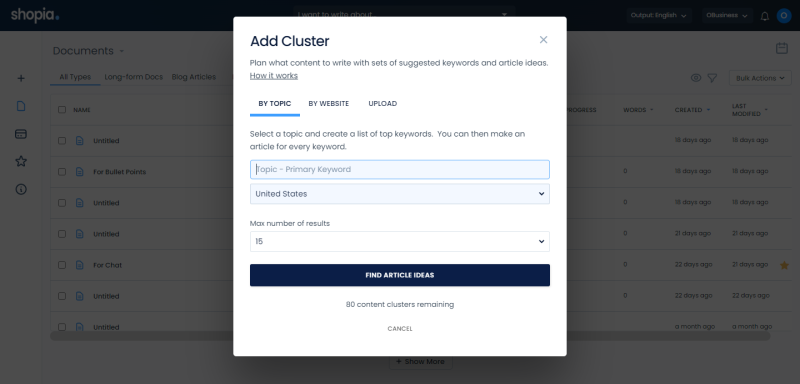
You can spend hours staring at spreadsheets trying to figure out what your audience wants, or you can let the software build a Topic Map.
Axelerate deploys AI research agents that reverse-engineer Google and ChatGPT searches to see what is actually working in your specific niche.
It pulls in every page from your competitors’ blogs, maps out their entire strategy, and spots the gaps they missed.
Then, it enriches that roadmap with Google Ads and real-time trend data. You see exactly who is searching, how often, and what your competitors are paying to reach them.
It stops you from guessing and hands you a clear, actionable publishing roadmap targeting the highest-value traffic.
Your Artificial Content Team
This is where the platform actually gets interesting for small teams.
Instead of treating AI like one giant slot machine for words, Axelerate breaks the workflow down into specialized AI Agents that mimic a full-scale content department.
- The SEO & Mapping Agents: They identify the search intent, capture the required facts, and build the structural blueprint.
- The Writer & Editor Agents: They turn that research into an engaging draft, place your internal links, and shape the flow to match your brand voice.
- The Authority & Media Agents: One fact-checks against trusted sources, the other pulls in the right visuals and graphics to keep readers scrolling.
Once the article is built, the platform doesn’t just abandon you.
It analyzes your peers to tell you exactly when to hit publish for maximum visibility, and then automatically spins that blog post out into multi-channel campaigns—social posts, ads, and emails.
But listen to me: do not just put this on autopilot and walk away. Let the machine build the boilerplate structure based on hard data. Let it answer the core questions.
Then, go in and inject your actual human perspective. Total coverage of the topic, zero gaps, but with your pulse.
Babysitting Decaying Content (The Audit Tool)
Content rots. You probably have a blog post that performed well three years ago sitting in your archives doing nothing.
Axelerate runs continuous content audits to keep your site fresh. It benchmarks your pages against competitors, flags outdated posts before your rankings drop, and automatically reviews your headers and metadata.
It even alerts you to keyword cannibalization. Instead of manually digging through analytics trying to figure out why a page died, the platform hands you actionable fixes to repair the damage.
Client Reporting That Doesn’t Suck
If you run an agency or freelance practice, you know the absolute worst part of the job is proving your worth to a client who doesn’t understand SEO.
Axelerate’s centralized management system translates deep, complex website analysis into plain-language reports and white-labeled slides.
You stop trying to explain search volume over a Zoom call, and start handing them clear data that proves exactly what you’ve done, how it drives revenue, and why you are worth your retainer.
Automating the Amazon Grind
If you sell e-commerce, you know that writing product descriptions is soul-crushing work. Especially when you have 50 items that are nearly identical.
The Product Listing tool generates unique, optimized descriptions that actually sound natural. Let the machine handle the repetitive inventory writing.
The Cost of Doing Business
Let’s be real here: Axelerate isn’t a cheap $10-a-month toy anymore. They’ve restructured their pricing to reflect the fact that this is a serious business operating system.
It’s an investment, but if you use it to replace the hours you spend doing manual research and building client reports, it pays for itself.
- Solo Plan ($49/month): Built for the lone wolf creator or freelancer. You get 600 credits, one user seat, and access to the core blog automation and content studio. It gives you the firepower without the agency overhead.
- Business Plan ($75/month): The sweet spot for small teams trying to punch up. You get three seats, 1,200 credits, and access to the multi-channel campaign builder and API automations.
- Agency Plan ($319/month): The heavy hitter for managing a massive roster. Ten seats, 6,000 credits, unlimited workspaces, and those crucial white-labeled prospect reports you need to actually close deals.
They also offer custom add-ons like client portals and approval flows if you want to build the entire client experience inside their walls without them ever knowing you are using third-party software.
The Verdict
Axelerate AI isn’t going to replace you. And at this price point, you shouldn’t want it to.
But if you are drowning in content demands, managing multiple brand voices, or trying to grow your traffic without hiring a full marketing team, it’s absolutely worth the entry fee.
Stop doing the robotic work. Delegate the structure, the research, and the reporting to the machine, and save your energy for the writing that actually matters.